
Set your boundaries.
Choose how many games to play and when to stop. Start with a plan that fits the time and attention you have today.
Your online chess, with intention
ChessCtrl helps you set the boundaries of a playing session, remember your own thinking and learn from the games you have played.
In development. Preparing a small beta.Public downloads and subscriptions are not open yet.
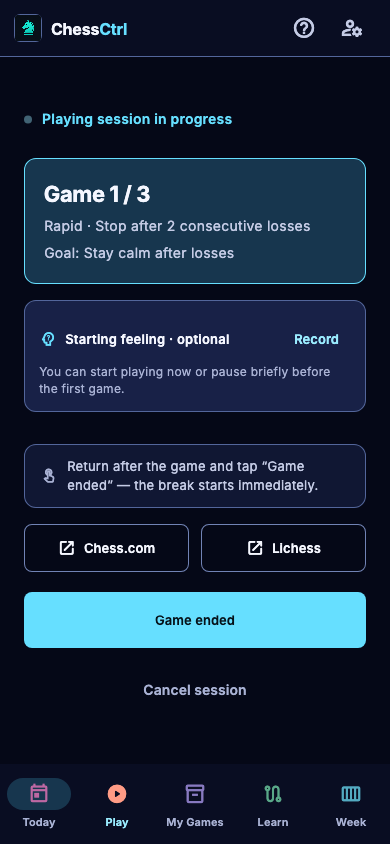
THE SESSION, FROM START TO FINISH
A companion to the chess you already play. Decide what a good session looks like before the result starts making that decision for you.
Choose how many games to play and when to stop. Start with a plan that fits the time and attention you have today.
When a loss is frustrating and you want to play again immediately, pause for a moment. Record how you feel and return to the boundaries you chose before your next game.
A mistake in your own game can become your next exercise. Try to find a better move yourself and check your answer with Stockfish. Practise one position at a time.
YOUR THOUGHT FIRST
An engine can show a stronger move. Your own notes preserve something different: what you saw, what you considered and why you chose your move.
“I saw the threat. I rushed the decision.”
Write your recollection before revealing the engine’s view.
Then explore the position.
Use Stockfish as a reference for the chess. Keep your experience in your own words.
YOUR GAMES, YOUR OBSERVATIONS
Your playing habits deserve attention alongside individual moves. Bring together patterns in your game history, your own opening branches and your personal notes.
Explore results as sessions progress and how quickly you start another game after a loss. Choose a time control and date range, and see how much data supports each observation.
Follow your openings move by move. See the game counts and results for each continuation, then return to the games that reached the same position. Find a concrete point you want to explore.
Write down what you were thinking, what frustrated you and what helped you pause. Keep your observations and the approaches that work for you, ready to revisit later.
Development features. Historical observations require enough available game data and describe what happened, not why. Commercial Chess.com access is still awaiting confirmation.
THE FIRST VERSION
We are preparing ChessCtrl for a small beta, with initial device testing on iPhone and iPad. Release dates and download links will be announced here when the app is ready.
PLANNED LAUNCH PRICE
€4.90/ month
Planned Finnish consumer price. Billing is not active. Store prices and availability will be confirmed before launch.
A FEW USEFUL DETAILS
On your usual chess platform. ChessCtrl is designed around the playing session and what you learn afterwards. It does not play games for you or provide assistance during a live game.
Automatic Chess.com retrieval is not open for the commercial release. We have requested written guidance on the intended use. We are also preparing user-directed PGN import. This site does not imply a partnership with Chess.com or Lichess.
Choose your game limit and stopping rule in advance, record how you feel and pause between games. Use your own notes to record what frustrated you and what helped you settle down. Return to both your plan and the approaches that work for you. You decide whether to continue or stop. ChessCtrl does not automatically detect tilt or block you from playing.
Exercises come from your own games and mistakes verified by Stockfish. You choose to start the analysis. Once the required analysis is complete, you can return to those positions, try a better move and check your answer. Reveal the solution when you want, and resume practice later.
Chess analysis and practice verification use the Stockfish chess engine. A conversational AI assistant is not enabled in the current test version, and its availability in the first release has not been confirmed. ChessCtrl makes no promise of a rating increase.
Email info@chessctrl.com to ask about the beta or share what you would like help with. We will discuss availability directly. There is no public signup or payment form on this website.
LET’S TALK CHESS
We would like to hear what makes starting, continuing or stopping a session difficult for you.
Beta enquiries, feedback and support